Pages

Sunday, October 23, 2011

Into_Forever - PTU

This tutorial was made and written by my own ideas any resemblance to other tutorials is purely coincidental.

Supplies Needed
Experienced PSP User
Scrapkit: Into_Forever by Pimp'd Designz
You can purchase her kit here
Mask249 by weescotslasscreations here
Font of choice. I'm using font called carattereROB
Plugin: Eye Candy 5-Impact-Glass

Elements used from kit
pd-chess-piece
pd-clock
pd-flora-01
pd-flora-02
pd-moon
pd-music-sheets
pd-pp-09
pd-ribbon-03
pd-sparkle2
pd-window-frame

Let's get Started
Open new raster 600x600
Copy and Paste window frame
Copy and Paste Paper drag to bottom in layer box
Go to layers-load/save mask-load mask from disk
Select mask-right click-merge-merge group
Adjust size to fit siggy
Copy and Paste remaining elements 
Add drop shadow *optional*
Add tube of choice move above window frame in layer box
Add name I applied glass effect with drop shadow
Add copyright info and we are done!

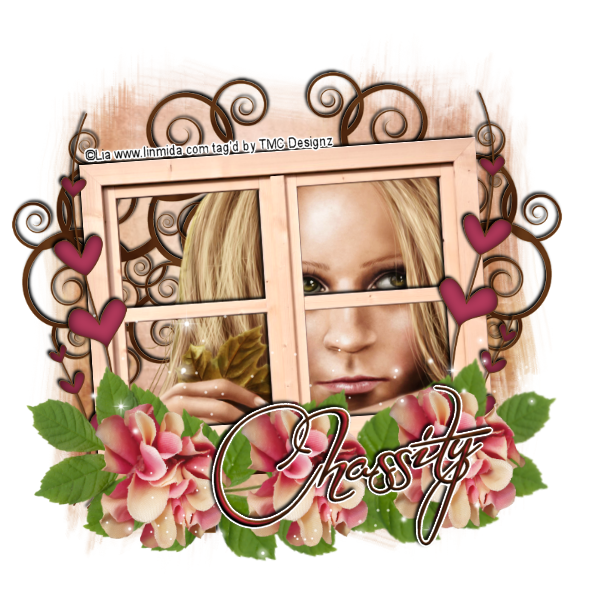
Friday, October 21, 2011

Elana - PTU

This tutorial was made and written by my own ideas any resemblance to other tutorials is purely coincidental.

Supplies Needed
Experienced PSP User
Scrapkit: Elana by PolkadotScraps
You can purchase her kit here
Tube of choice. I'm using artist Lia
You can find her artwork here
Mask117 by weescotslasscreations here
Font of choice. I'm using font called Before the Rain
Plugin: Eye Candy 5-Impact-Gradient Glow

Elements used from kit
PDS_VDE_flower2
PDS_VDE_hearts1
PDS_VDE_leaves1
PDS_VDE_paper5
PDS_VDE_sparkle1
PDS_VDE_tree1
PDS_VDE_window1

Let's get Started
Open new raster 600x600 
Copy and Paste window I applied drop shadow
Copy and Paste paper drag to bottom in layer box
Go to layers-load/save mask-load mask from disk
Select mask-right click-merge-merge group
Adjust size to siggy
Copy and Paste tree apply drop shadow drag above mask layer
Duplicate-image-mirror
Copy and Paste tube of choice
Duplicate-double click on copy-change blend mode to soft light
Copy and Paste hearts-duplicate-image-mirror
Copy and Paste leaves duplicate 2x so you now have 3 layers
On 2 of leaves go to image-mirror
Copy and Paste flowers duplicate 2x so you now have 3 layers
Arrange by sample
Add sparkles drag to top in layer box
Add name I applied inner bevel-gradient glow-drop shadow
Add copyright info and we are done!

Thursday, October 20, 2011

Fall In Love - PTU

This tutorial was made and written by my own ideas any resemblance to other tutorials is purely coincidental.

Supplies Needed
Experienced PSP User
Scrapkit: Fall in Love by Kikeka
You can purchase her kit here
Font of choice.I'm using font called Tabitha
Plugin: Eye Candy 5-Impact-Glass

Elements used from kit
cbg_fallinlove_book
cbg_fallinlove_bow02
cbg_fallinlove_boy
cbg_falllinlove_flower09
cbg_fallinlove_frame01
cbg_fallinlove_girl
cbg_fallinlove_paper02
cbg_fallinlove_scatter02
cbg_fallinlove_tree01
cbg_fallinlove_wordart01

Let's get Started
Open new raster 600x600
Copy and Paste frame
Copy and Paste paper drag to bottom in layer box
Adjust size so fits inside frame
Use eraser tool to remove access
Copy and Paste flower9 drag to bottom in layer box
Duplicate-image-mirror apply by sample
Copy and Paste scatter drag to bottom in layer box
Duplicate 2x so you now have 3 layers
Copy and Paste remaining elements
On bow go to image-mirror
Add drop shadow to wordart
Place the girl and boy below frame layer
Add name I applied glass with drop shadow
Add copyright info and we are done!

Wednesday, October 19, 2011

November - PTU

This tutorial was made and written by my own ideas any resemblance to other tutorials is purely coincidental.

Supplies Needed
Experienced PSP User
Scrapkit: November by Pimp'd Designz
You can purchase her kit here
Tube of choice. I'm use ftu artist Cris Ortega
You can view her work here
Font of choice. I'm using font called HelenaScript ES
Plugin: Eye Candy 5-Impact-Gradient Glow-Glass

Elements used from kit
pd-flower-01
pd-frame-01
pd-key
pd-lace-01
pd-leaf
pd-pp-08
pd-spider
pd-spiderweb
pd-splatter-01
pd-tulle-01

Let's get Started
Open new raster 600x600
Copy and Paste frame go to image rotate left
Copy and Paste paper drag to bottom in layer box
adjust size to fit inside frame
Copy and Paste tulle duplicate
Repeat same steps on splatter and flower
Copy and Paste leaf duplicate-image-mirror
Copy and Paste remaining elements
Copy and Paste tube of choice
Add name I applied Glass effect with gradient glow
Add copyright info and we are done!


goff - PTU

This tutorial was made and written by my own ideas any resemblance to other tutorials is purely coincidental.

Supplies Needed
Experienced PSP User
Scrapkit: goff by Pimp'd Designz
You can purchase her kit here
Font of choice. I'm using font called Narnia BLL
Tube of choice. I'm using ftu artist Josh Howard
You can view his work here
Mask105 by weescotslasscreations here
Plugin: Eye Candy 5-Impact-Gradient Glow-Glass
Plugin: Xero-Radiance

Elements used from kit
pd-flower-02
pd-frame-01
pd-lips
pd-pp-03
pd-pp-10
pd-print-01
pd-string-03
pd-swirl-01

Let's get Started
Open new raster 600x600
Copy and Paste frame
Copy and Paste pp3
Go to layers-load/save mask-load mask from disk
Select-right click-merge-merge group
Adjust size to fit siggy
Copy and Paste pp10 adjust size so fits inside frame
Use eraser tool to remove outside access
Double click on paper in layer box
Change opacity to 60
Copy and Paste print drag to bottom in layer box
Duplicate 3x so you now have 4 layers arrange by sample
Copy and Paste swirls duplicate 2x so you now have 3 layers
On one go to image-mirror
Do same steps on the flower
Copy and Paste lips duplicate and arrange around frame
Copy and Paste string drag above flowers in layer box
Copy and Paste tube of choice 
I applied radiance effect with drop shadow *optional*
Use eraser tool on tube layer so looks like shes inside frame
Add name I applied glass effect-gradient glow
Add copyright info and we are done!

Sunday, October 16, 2011

Beauti-Licious Award


BEAUTI♥LICIOUS AWARD!

This award is for the Beautiful Women (and Men)
who grace us with their talents
in the Tagger Community.
The intent of this award is to pass it on
to the Designer, Tagger, or Artist
who has inspired you with their endless talent
and who has touched your heart.
There are many out there.
Let's see how far we can pass this on.
Once you have received this award
Please pass it on to five blogs
to show some love
for those who truly are BEAUTIFUL.

*I just got this award*
♥Thank you, Victoria♥

I choose to pass it to:


Thursday, October 13, 2011

Haunted - PTU

This tutorial was made and written by my own ideas any resemblance to other tutorials is purely coincidental.

Supplies Needed
Experienced PSP User
Scrapkit: Haunted by Designs by Sarah
You can purchase her kit here
Tube of choice. I'm using artwork by Lisak
You can view her work here 
Go to under her my kits and there are freebies there
Template by Melissa you can download here
Mask of choice. I'm using mask320 by weescotslasscreations here
Font of choice. I'm using font called Callie Hand
Plugin: Eye Candy 5-Impact-Gradient Glow

Elements used from kit
sb_pmt_haunted_bow 3
sb_pmt_haunted_bow 5
sb_pmt_haunted_bow 9
sb_pmt_haunted_broken glass
sb_pmt_haunted_chandelier
sb_pmt_haunted_corner 1
sb_pmt_haunted_flower 4
sb_pmt_haunted_frame 1
sb_pmt_haunted_pp 1
sb_pmt_haunted_pp 7
sb_pmt_haunted_pp 12
sb_pmt_haunted_tag 1
sb_pmt_haunted_tag 2

Let's get Started
Open template close out raster 6 layers and white bckground layer
Select raster 3 in layer box
Selections-select all-float-defloat-invert
Copy and Paste paper 7 hit delete on keyboard
Selections-select none-add gradient glow
Select merged circle layers
Selections-select all-float-defloat-invert
Copy and Paste paper 1 hit delete on keyboard
Selections-select none-add gradient glow
Copy and Paste the tags inside the center frames
On frame layer add gradient glow
Copy and Paste the brokenglass on the tag layers
Copy and Paste paper12 drag to bottom in layer box
Go to layers-load/save mask-load mask from disk
Select mask-right click-merge-merge group
Adjust to fit siggy
Copy and Paste remaining elements
On the bows and corner I duplicated-image-mirror
I applied gradient glow to cat 
Copy and Paste tube of choice
Add name I applied gradient glow with drop shadow
Add copyright info and we are done!