Pages

Wednesday, June 26, 2013

Kawaii Candyland - PTU


This tutorial was made and written by my own ideas any resemblance to other tutorials is purely coincidental.

supplies needed
for experienced PSP User
Scrapkit: Kawaii Candyland by PinkParadox Productions
You can purchase her kit here
Tube of choice. I'm using artwork by lia 
You can view artwork here
Font of choice. I'm using font called Dream Cake
Plugin: Eye Candy 5-Impact-Gradient Glow

Elements used from kit
Kawaii Candyland-E9
Kawaii Candyland-E29
Kawaii Candyland-E51
Kawaii Candyland-E60
Kawaii Candyland-E72
Kawaii Candyland-E74
Kawaii Candyland-E77
Kawaii Candyland-E79
Kawaii Candyland-E83
Kawaii Candyland-E98
Kawaii Candyland-E119
Kawaii Candyland-E122
Kawaii Candyland-E172
Kawaii Candyland-E180
Kawaii Candyland-F2
Kawaii Candyland-F12
Kawaii Candyland-P5

Let's get Started
Open new raster 600x600
Copy and Paste frames 
copy and Paste p5 drag below frame layers
adjust size so fits inside
Copy and Paste rainbow place above paper layer
Copy and Paste elements by sample
On sucker duplicate-image-mirror
On the flowers duplicate and arrange by sample
Copy and Paste tube of choice I applied drop shadow
Add name I applied Gradient Glow with drop shadow
Add copyright info and we are done!

Monday, June 24, 2013

Dance for Me - PTU

This tutorial was made and written by my own ideas any resemblance to other tutorials is purely coincidental.

supplies needed 
For experienced PSP User
scrapkit: Dance for Me by CreativeScrapsbyCrys
You can purchase her kit here
Font of choice. I'm using font called allura
Plugin : Eye Candy 5-Impact-Gradient 

Elements used from kit
DFM_Element_1
DFM_Element_4
DFM_Element_8
DFM_Element_19
DFM_Element_20
DFM_Element_39
DFM_Element_41
DFM_Element_42
DFM_Element_48

Let's get Started
Open new raster 600x600
copy and Paste mirror place in center of raster
Copy and Paste leaf duplicate 2x on one go to image-mirror
Copy and Paste flowers duplicate by sample
Copy and Paste remaining elements by sample
On the shoes duplicate-image-mirror
Add name I applied Gradient Glow with drop shadow
Add credit info and we are done!

Saturday, June 22, 2013

Girly Goth - PTU

This tutorial was made and written by my own ideas any resemblance to other tutorials is purely coincidental.

Supplies Needed
For experienced PSP User
Scrapkit: Girly Goth by PinkParadox Productions
You can purchase her kit here
Tube of choice. I'm using artwork by Arthur Crowe
You can purchase his work here
Font of choice. I'm using font called Van Helsing
Plugin: Eye Candy 5-Impact-Gradient Glow
Plugin: Xero-Radiance

Elements used from kit
PPP-Girly Goth-E9
PPP-Girly Goth-E11
PPP-Girly Goth-E18
PPP-Girly Goth-E21
PPP-Girly Goth-E26
PPP-Girly Goth-E32
PPP-Girly Goth-E44
PPP-Girly Goth-E45
PPP-Girly Goth-E66
PPP-Girly Goth-E79
PPP-Girly Goth-E101
PPP-Girly Goth-E107
PPP-Girly Goth-E108
PPP-Girly Goth-E122
PPP-Girly Goth-E130
PPP-Girly Goth-E175
PPP-Girly Goth-E183

Let's get Started
Open new raster 600x600
Copy and Paste mirrors on heart duplicate-image-mirror
Copy and Paste leaf go to image-rotate right-flip
Drag to bottom of mirrors duplicate image-mirror
Copy and Paste grass drag above leaf layer and duplicate
Copy and Paste cat duplicate-image-mirror
Copy and Paste pink leaves duplicate 2x on one go to image-mirror
Copy and Paste beads duplicate-image-mirror
Copy and Paste remaining elements by sample
Copy and Paste tube of choice place in center of mirror
I applied Radiance Effect (optional)
Copy and Paste close up tube place above heart mirror 
Select on heart mirror use magic wand inside 
Select close up tube layer go to selections-invert-hit delete on keyboard
Double click on close up tube layer and change opacity to 50 
Now Copy and Paste tube go to image-mirror place on other side
Add name I applied Gradient Glow with drop shadow
add copyright info and we are done!

Friday, June 21, 2013

Fallen - PTU


This tutorial was made and written by my own ideas any resemblance to other tutorials is purely coincidental.

Supplies Needed
For experienced PSP User
Scrapkit: Fallen by Designs by Sarah
You can purchase her kit here
Tube of choice. I'm using artwork by Cris Ortega
You can view work here
Font of choice. I'm using font called Ginga

Elements used from kit
sb_pmt_fallen_cross
sb_pmt_fallen_feather1
sb_pmt_fallen_flower1
sb_pmt_fallen_flower2
sb_pmt_fallen_flower4
sb_pmt_fallen_frame5
sb_pmt_fallen_heart1
sb_pmt_fallen_leaf1
sb_pmt_fallen_lights
sb_pmt_fallen_mask1
sb_pmt_fallen_moon clouds2
sb_pmt_fallen_pp5
sb_pmt_fallen_print1
sb_pmt_fallen_print2
sb_pmt_fallen_ribbon3

Let's get Started
Open new raster 600x600
copy and Paste frame
Copy and Paste pp5 drag below frame layer
Adjust size so fits inside frame
Copy and Paste mooncloud, mask, print1 drag to bottom in raster layer
Copy and Paste leaf duplicate-image-mirror
Copy and Paste flowers duplicate and arrange above frame layer
Copy and Paste print2 drag below elements
Copy and Paste clouds2 drag above paper layer
Copy and Paste tube of choice drag under cloud layer
Add name and copyright info and we are done!

Monday, June 17, 2013

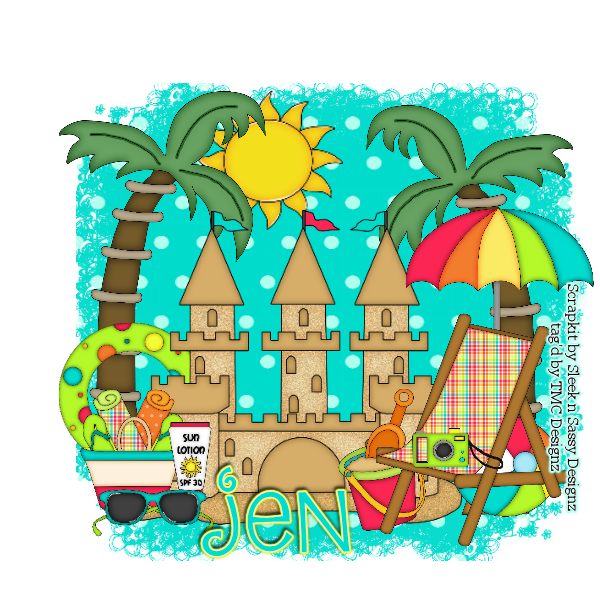
Days of Summer - PTU


This tutorial was made and written by my own ideas any resemblance to other tutorials is purely coincidental.

supplies needed
For experienced PSP User
scrapkit: Days of Summer by Sleek n Sassy Designz
You can purchase her kit here
font of choice.I'm using font called Dream Cake
Mask of choice. I'm using Mask282 by weescotslasscreations here
Plugin: Eye candy 5-Impact-Gradient Glow

Elements used from kit
DOS_Element1
DOS_Element2
DOS_Element4
DOS_Element5
DOS_Element6
DOS_Element7
DOS_Element8
DOS_Element9
DOS_Element12
DOS_Element14
DOS_Element15
DOS_Element17
DOS_Paper6

Let's get Started
Open new raster 600x600
Copy and Paste sand castle in center of raster
Copy and Paste palm tree duplicate-image-mirror
Copy and Paste Paper6 drag to bottom of raster
Go to layers-load/save mask-load mask from disk
Select mask-right click-merge down adjust size if needed
Copy and Paste remaining elements by sample
Add name I applied Gradient Glow with drop shadow
Add credit info and we are done!

Gypsy Girl - PTU


This tutorial was made and written by my own ideas any resemblance to other tutorials is  purely coincidental.

Supplies Needed
For experienced PSP User
Scrapkit: Gypsy Girl by PinkParadox Productions
You can purchase her kit here
Font of choice.I'm using font called Same-Sex marriage
Plugin: Eye candy 5-Impact-Gradient Glow

Elements used from kit
PPP-Gypsy Girl-E1
PPP-Gypsy Girl-E4
PPP-Gypsy Girl-E5
PPP-Gypsy Girl-E9
PPP-Gypsy Girl-E19
PPP-Gypsy Girl-E35
PPP-Gypsy Girl-E41
PPP-Gypsy Girl-E58
PPP-Gypsy Girl-E59
PPP-Gypsy Girl-E61
PPP-Gypsy Girl-E63
PPP-Gypsy Girl-E89
PPP-Gypsy Girl-E111
PPP-Gypsy Girl-F6
PPP-Gypsy Girl-P2

Let's get Started
Open new raster 600x600
Copy and Paste frame
Copy and Paste P2 drag below frame layer
Adjust size so fits inside use eraser tool to remove outside access
Copy and Paste birds place above paper layer
Copy and Paste horse place inside frame
Copy and Paste sparkle drag below horse
copy and Paste flowers and duplicate
Copy and Paste remaining elements by sample
On books and ribbon duplicate-image-mirror
Add name I applied Gradient Glow with drop shadow
Add credit info and we are done!

Thursday, June 13, 2013

Citrus - PTU


This tutorial was made and written by my own ideas any resemblance to other tutorials is purely coincidental.

Supplies Needed
For experienced PSP User
Scrapkit: Citrus by PinkParadox Productions
You can purchase her kit here
Font of choice.I'm using font called Lovers Quarrel
Tube of choice.I'm using artwork by Alex Prihodko
You can purchase artwork here
Plugin: eye candy 5-Impact-Gradient Glow
Plugin: Xero-Radiance

Elements used from kit
PPP-Citrus-E4
PPP-Citrus-E7
PPP-Citrus-E12
PPP-Citrus-E33
PPP-Citrus-E45
PPP-Citrus-E53
PPP-Citrus-E54
PPP-Citrus-E97
PPP-Citrus-E99
PPP-Citrus-E115
PPP-Citrus-F2
PPP-Citrus-P4

Let's get started
Open new raster 600x600
Copy and Paste F2
Copy and Paste P4 drag below frame layer
Adjust size so fits inside
Copy and Paste leaves duplicate 3x on 1 go to image-mirror
Copy and Paste lemonade drag below leaves layer
Copy and Paste flower scatter drag to bottom of raster
Copy and Paste sparkle place above frame layer
Copy and Paste remaining elements by sample
On flowers duplicate and apply drop shadow
Copy and Paste tube of choice drag below elements
I applied Radiance ( optional ) add drop shadow
Add name I applied Gradient Glow with drop shadow
Add copyright info and we are done!