Pages

Sunday, March 30, 2014

London After Midnight - PTU

This tutorial was made and written by my own ideas any resemblance to other tutorials is purely coincidental.

Supplies Needed
For experienced PSP User

Tube: Artwork by Alex Prihodko
You can purchase here

Scrapkit: London after Midnight by PinkParadox Productions
You can purchase here

Font of choice. I'm using font called Vladimir Script

Plugin: Xero-Radiance

Elements used from kit
London After Midnight 69
London After Midnight 117
London After midnight 134
London After Midnight 137
London After Midnight 158
London After Midnight 175
London After Midnight 177
London After Midnight 191
London After Midnight Frames 13
London After Midnight Papers 14

Let's get Started
Open new raster 700x700
copy and Paste frame 
Copy and Paste Paper14 drag below frame layer
Adjust size and use eraser to remove outside access
Copy and Paste web place above frame layer
Copy and Paste statues duplicate-image-mirror
Copy and Paste leaves place above frame layer
Copy and Paste roses and arrange by sample
Copy and Paste remaining elements by sample
Copy and Paste tube of choice
Add name I applied Drop shadow
Add copyright info
(optional)
Merge layers invisible and apply Radiance Effect

Saturday, March 29, 2014

Summer Lovin - PTU

 
This tutorial was made and written by my own ideas any resemblance to other tutorials is purely coincidental.
 
Supplies Needed
For experienced PSP User
 
Tube: Artwork by Verymany
You can purchase here
 
Scrapkit: Summer Lovin by PinkParadox Productions
You can purchase here
 
Font of choice. I'm using font called Allura
 
Plugin: Eye Candy 5-Impact-Gradient Glow
 
Plugin: Xero-Radiance
 
Elements used from kit
SummerLovin Elements 27
SummerLovin elements 39
Summer Lovin Elements 65
SummerLovin Elements 66
Summer Lovin elements 67
Summer Lovin Elements 75
Summer Lovin elements 76
Summer Lovin Elements 92
Summer Lovin Elements 104
Summer Lovin Frames2
SummerLovin Papers10
 
Let's get Started
Open new raster 700x700
Copy and Paste frame
Copy and Paste Paper10 drag below frame layer
Adjust size so fits inside
Copy and Paste net place around frame layer
Copy and Paste flower cluster duplicate and arrange by sample
Copy and Paste remaining elements
copy and Paste tube of choice
Merge all layers invisible and apply Radiance Effect
(optional)
Add name and copyright info and we are done!
 

Sunday, March 23, 2014

Beauty - PTU

This tutorial was made and written by my own ideas any resemblance to other tutorials is purely coincidental.
 
Supplies Needed
For experienced PSP User
 
Tube: Artwork by The Hunter called Beauty
 
Scrapkit: Matching kit with same name by Bibi's Collection
Both products can be purchased here
 
Font of choice. I'm using font called Van Helsing
 
Plugin: Eye candy 5-Impact-Gradient Glow
 
Plugin: Xero-Radiance
 
Elements used from kit
BibiBeauty Elems16
BibiBeauty Elems60
BibiBeauty Elems67
BibiBeauty Elems74
BibiBeauty Elems77
BibiBeauty Elems78
BibiBeauty Elems84
BibiBeauty Elems110
BibiBeauty Elems112
BibiBeauty Elems113
BibiBeauty Elems130
BibiBeauty Papers8
 
Let's get Started
Open new raster 700x700
Copy and Paste frame
Copy and Paste Papers8 drag below frame layer
Adjust size and use eraser tool to remove outside access
Copy and Paste grass layer drag above frame layer
Copy and Paste wordart adjust size and duplicate
Copy and Paste black roses place on frame layer
Duplicate-image-mirror
Copy and Paste rose duplicate and arrange by sample
Copy and Paste remaining elements by sample
Copy and Paste tube of choice
I applied Radiance Effect with drop shadow
Add name I applied Gradient Glow
Add copyright info and we are done!

Fresh & Fruity - PTU

This tutorial was made and written by my own ideas any resemblance to other tutorials is purely coincidental.
 
supplies needed
For experienced PSP User
 
tube: artwork by verymany
You can purchase here
 
scrapkit: Fresh & Fruity by PinkParadox Productions
You can purchase here
 
Font of choice. I'm using font called parisienne
 
Plugin: Eye Candy 5-Impact-Gradient Glow
 
Plugin: Xero-Radiance
 
elements used from kit
Fresh & fruity 5
Fresh & Fruity 9
Fresh & Fruity 68
Fresh & Fruity 87
Fresh & Fruity 107
Fresh & Fruity 124
Fresh & Fruity 141
Fresh & Fruity 153
Fresh & Fruity 157
 
Let's get Started
Open new raster 700x700
Copy and Paste fence place in center of raster
copy and Paste grass duplicate and arrange by sample
Copy and Paste flower vines apply drop shadow
Duplicate-image-mirror
Copy and Paste lady bugs duplicate-image-mirror
Copy and Paste white flower apply drop shadow
Duplicate and arrange by sample
Copy and Paste remaining elements by sample
Copy and Paste tube of choice
Merge all layers to invisible layer in raster
I applied Radiance Effect (optional)
Add name I applied Gradient Glow with drop shadow
Add copyright info and we are done!

Saturday, March 22, 2014

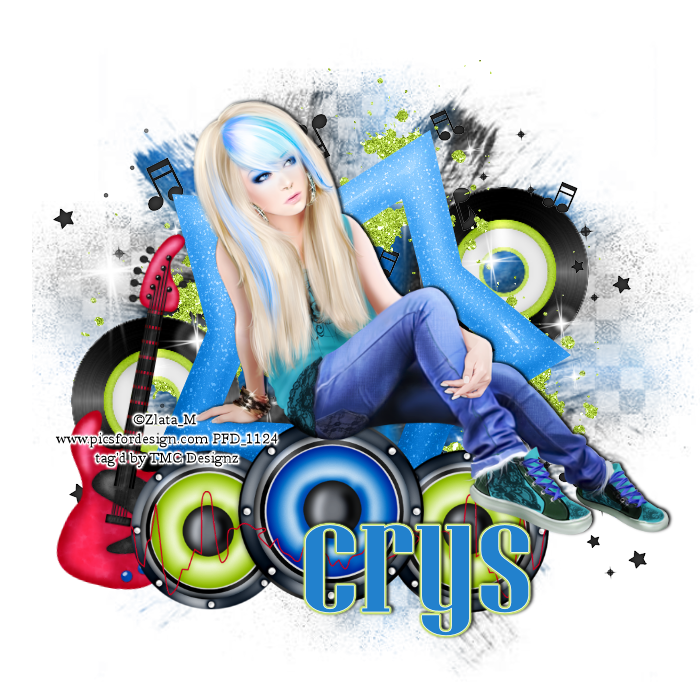
Girls Rock Too - PTU

This tutorial was made and written by my own ideas any resemblance to other tutorials is purely coincidental.
 
Supplies Needed
For experienced PSP User
 
tube: Artwork by Zlata_M
You can purchase here
 
Scrapkit: Girls Rock too by  CreativeScrapsbyCrys
You can purchase here
 
Font of choice. Im using font called Niagara Solid
 
Mask of choice. I'm using mask349 by vixpsp here
 
Plugin: Eye Candy 5-Gradient Glow
 
Plugin: Xero-Radiance
 
Elements used from kit
GRT_Element_1
GRT_Element_12
GRT_Element_16
GRT_Element_18
GRT_Element_23
GRT_Element_29
GRT_Element_30
GRT_Paper_10
 
Let's get Started
Copy and Paste Star element
Copy and Paste Paper10
Go to layers-load/save mask-load mask from disk
Right click-merge-merge down
Adjust size if needed
Copy and Paste elements by sample
Copy and Paste tube of choice
I applied Radiance Effect with drop shadow
add name I applied Gradient Glow with drop shadow
Add copyright info and we are done!

Endless Meadows - PTU

 
This tutorial was made and written by my own ideas any resemblance to other tutorials is purely coincidental.
 
supplies Needed
For experienced PSP Users
 
Tube: Artwork by Arthur Crowe
You can purchase here
 
Scrapkit: Endless Meadows by PinkParadox Productions
You can purchase here
 
font of choice. I'm using font called Script MT Bold
 
Plugin: Eye Candy 5-Impact-Gradient Glow
 
Plugin: Xero-Radiance
 
Elements used from kit
Endless Meadows 51
Endless Meadows 76
Endless Meadows 79
Endless Meadows 81
Endless Meadows 97
Endless Meadows 122
Endless Meadows Frames1
Endless Meadows Papers 14
 
Let's get Started
Open new raster 700x700
Copy and Paste frame
Copy and Paste Papers 14 drag below frame layer
Use eraser tool to remove outside access
Copy and Paste tree go to image-mirror place under frame layer
Copy and Paste cluster flowers and duplicate
Copy and Paste remaining elements by sample
Copy and Paste tube of choice I applied Radiance (optional)
Add name I applied Gradient Glow with drop shadow
Add copyright info and we are done!

Friday, March 21, 2014

Jenny - PTU

 
This tutorial was made and written by my own ideas any resemblance to other tutorials is purely coincidental.
 
Supplies Needed
For experienced PSP User
 
Artwork: I'm using artwork by Zlata_M
You can purchase here
 
Scrapkit: I'm using kit by CreativeScrapsbyCrys called Jenny
You can purchase here
 
Font of choice. I'm using font called LainieDaySH
 
Plugin: Eye Candy 5-Impact-Gradient Glow
 
Plugin: Xero-Radiance
 
Elements used from kit
J_Element_9
J_Element_10
J_Element_12
J_Element_17
J_Element_23
J_Element_24
J_Element_25
J_Frame_2
J_Paper_2
 
Let's get Started
Open new raster 700x700
Copy and Paste Paper drag below frame layer
Copy and Paste flower cluster place on center of frame
Copy and Paste leaves-duplicate-image-mirror
Copy and Paste remaining elements by sample
Copy and Paste tube of choice. I applied Radiance Effect (optional)
Add name I applied Gradient Glow with drop shadow
Add copyright info and we are done!